
On this page
- The Cognitive Complexity of Non-Familiarity within Engineering Workflows
- The Shape Remains the Same
- The Development Surface Moved to Team Chat
- How to Turn an Agent Into a Team Member
- Giving Claude Tag Instructions and Access to Tooling
- Agents Handing Work To Other Agents
- What Changed for Us
- Options for Non-Claude/Non-Slack Shops
- How to Make This Work for You and Your Team
- What It Costs and How We Keep It Down
- The Joy of Working with Agentic Personality
- The Only Constant is Change
Tell me if this sounds like you:
- You wish your non-technical team could ship product changes without having to involve engineering.
- Ship more with less process? Who wouldn’t want this?
- You dream of the day AI can take over your Level 1 Triage Support (and potentially more).
- That’s a reliability director’s dream come true.
- You wish you had an easy way to centralize all the tooling you interact with everyday.
- Because using siloed tools feels like herding cats made of data.
You’re likely nodding your head in agreement to one, if not all three, of these issues.
You’re not the only one. We felt the same exact way.
We solved all three, and by the end of this post you’ll see how.
The Cognitive Complexity of Non-Familiarity within Engineering Workflows
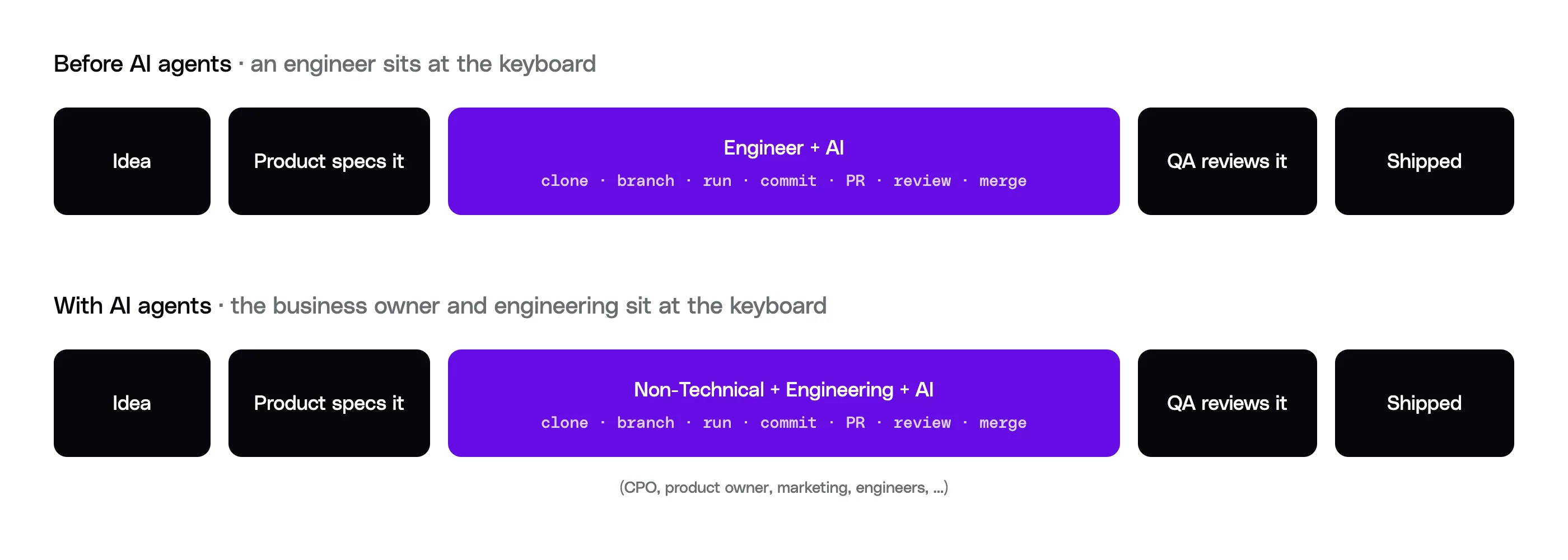
Prior to AI agents arriving on the scene, software development had the same procedure:
- Someone (often a non-technical person) comes up with an idea
- Product team specs it out
- Engineering implements it
- QA reviews it
- Product is shipped
Anywhere in this cycle, one step can send you back to the previous step. The engineers might find an issue or limitation within the plan, so it must return to product for refinement and clarification.
QA can find an issue with the code, which sends it back to engineering to fix. That can send it back to product again due to an issue (repeating what was said above).
This cycle goes on and on and on until the feature or product is complete.
AI changed this.
Now, non-technical team members can just as easily fire up a coding agent of their choice (Claude Code, Codex, etc) and start iterating on a product.
However, therein lies the rub.
The process didn’t change. The person doing it did.
Now the business owner is the one at the keyboard, and everything an engineer does naturally is new to the non-technical members, yet they’re expected to “just ship it.”
This is a significant cognitive load for someone to carry who has never dealt with this workflow before.
Your CPO, product owner, marketing team or any non-technical member of your team usually has zero clue how to get set up to contribute to a project because of the technical complexities.
What is second nature to an engineer looks like complete Greek to a non-technical contributor. That’s no fault of their own; that’s just the nature of the situation.
They likely need to jump over the following hurdles …
- Setting up a GitHub Account
- Setting up a Git connector
- Accessing the code repository (heck, and if there are many, which one is it!?)
- They need to be shown how to run the app locally (sometimes, depending on agent configuration)
- They also need to understand post-build workflow, such as committing the code, opening a pull request (PR), and handling code reviews.
- Deploying to staging and production
- etc
Let’s not even get into the esoteric corners of everyday software engineering, like resolving merge conflicts or what they even are. That’s a whole other ball of wax when it comes to non-technical people (however, agents do help here immensely).
Have you tried to explain to a non-technical person what a merge conflict is? If not, try explaining it to a family member who is not in tech. You’ll see their eyes glaze over quickly.
Here at Polygon and at a major consumer-app company before it, I’ve walked well over a hundred non-technical contributors through GitHub, its concepts, workflows, and the rest, and they’ve all expressed the same sentiment: it’s not exactly the easiest or most enjoyable thing for them to do.
Why?
Because they just want to change the button color, move something on a screen, or fix a simple bug. In slightly more complex scenarios they might have AI help them build out a new feature or spike out a new solution and explore an idea.
Often many non-technical contributors really do want to make these changes, but time is a constraint.
They don’t have 20-30 minutes to remember to update their branch, figure out what directory the repo is cloned in, or open it in Claude Code (desktop or CLI) and start working. Due to this friction they eventually give up and just add a ticket to the backlog for engineering to take.
They don’t have the time, nor the energy, to deal with the hassle of learning and performing the dance.
It’s like living in a two-story house and needing to take the laundry upstairs to put away. Instead, you leave it in a basket at the bottom of the stairs because going upstairs is too much of a pain right now and “you’ll just do it later.”
Same with many changes that non-technical (and some technical) people want to make in code bases: they put it off or delegate it. It seems simple and silly, but this happens.
Ultimately, the effort to get the proverbial ball rolling and follow it through to completion is out of proportion to the task itself, so you end up postponing the task.
This is known as activation energy: it’s how much effort it takes to get things going. It’s a feeling we’re all familiar with. We get some momentum and then we’re finally on a roll. But getting to that point takes some activation energy.
Even though non-technical contributors have been enabled, they now have a new set of technical skills to master and manage (even if AI is helping them), and that’s an additional cognitive tax that compounds and prevents some people from executing.
The Shape Remains the Same
Enabling non-technical members to ship code with the help of AI allows the entire team to increase velocity across the organization as there are more people at the keyboard.
The process didn’t change, the number and type of people doing it did.
While scaling across the org with agents is a solved problem (sort of), it doesn’t always go as smoothly as one would hope.
When tools encounter errors (context limits, environment limits, and more), the non-technical contributor is stuck and they need engineering to fix it.
That’s one issue, but there are more.
The first one is an even more potent and expensive issue … context switching.
Issue #1: Context Switching
When a non-technical contributor has to focus on technology configuration and fixing engineering problems, it pulls them away from their core responsibility, and it costs more than time itself.
The psychological cost of this context switching compounds quickly.
We’ve all had days where we’ve been pulled in a million directions. Meetings, bug reports, hot fixes, support, admin/HR work, and then some required training or a random all-hands meeting thrown in the mix.
The end of the day comes and you’re left standing there with your palms facing up, looking side to side and thinking:
I didn’t get anything done today. I was “busy”, but I got NOTHING done.
Ultimately, passing the engineering tooling, setup, maintenance and software development workflow management to a non-technical contributor is likely not the best idea. You’re just kicking the ball (the problem) down the road.
There are companies that do train all employees (technical and non-technical) to operate as engineers operate. I’ve learned of a company whose legal department was trained on how to use Claude Code as their interface with AI. That seems inefficient for a non-technical user, and it is likely a frustrating experience for them.
If your org has the support for that, then it can likely work, but for a lot of orgs it simply doesn’t work due to key resource constraints to help support this level and style of adoption.
This is when the right tool for the right job comes into play.
At a fundamental level many of the non-technical staff do not want to deal with the technical issues as they have many other important things to take care of. It’s a frustrating distraction for them.
Issue #2: Triage & Data Connectivity
Above I mentioned that eventually you start to find yourself spending too much time sifting through various tools to manage your systems and teams.
This data is stored in disparate systems for good, bad or unknown reasons, and often you can’t do much about it.
Alerts are coming in from multiple systems (Datadog, Grafana, Sentry, Bugsnag, Ironclad, Workday, some random email, etc) and what keeps going through your head is:
It sure would be great if an agent could handle these and triage this mess.
Eventually you find yourself setting up multiple skills and connectors in Claude (or the agent harness of your preference) and then start investigating issues. This works, and is super helpful, but deep down you feel that this could be done even better and more efficiently.
Your dream is to have an agent that responds to all the events, performs a diagnosis across systems, and then hands you that diagnosis backed by grounded research, along with some potential solutions.
Then an agent could message you in a channel and say something like:
I identified the issue, I traced it from the inception of event X, through system Y, and found the source issue to be with Z. A potential fix is to update ABC in XYZ system, would you like me to open a PR to do that or would you like me to do more research? (Some AI Agent)
Issue #3: Systems Integration & Automation
Lastly, you likely dream of having a single AI tool that’s connected to all of your systems so you can perform analysis with a simple chat message. Instead, you’re stuck querying multiple systems and being a meat proxy that copies and pastes the findings into a team chat so you can share the data you need.
Sure, you can connect these systems in your local environment via whatever AI harness you’re using, but it falls apart when you need to share that data, and when you need multiple people to interact with the information in the message.
We’ve all been part of conversations at work in a team chat that have had this happen:
Here’s what Claude/ChatGPT/Gemini/etc said: <some-overly-verbose-wall-of-text>
Same thing happens in GitHub pull requests. I’ve seen engineers who were asked for a code review simply copy-pasta a reply from their AI into the PR comments. What’s the need for the human at that point? The AI is doing everything.
It would be better if an AI could reply to messages with additional context that it found for you so you can save that time of doing it yourself.
All of these examples illustrate the same point: you’re back to being the chokepoint. The reason is that there’s no centralized way to communicate with the various systems to get the data that you need in a collaborative and event-driven setting that absolves you of being said meat proxy.
The Development Surface Moved to Team Chat
We’ve already established that a lawyer and a marketing director do not want to work in Claude Code in the terminal. A recruiter does not want to spend his time in Cursor figuring out some esoteric IDE when he could be recruiting. We were handing the wrong tool to the wrong people.
For us the picture was clear: the access to tools was there, but the tooling and method of access were wrong. Not everyone wants to be in a terminal or coding session doing engineering tasks.
As engineers we don’t even see it because it’s a tax we’re used to paying, and we forgot that it was a tax at all.
So the question became …
What if we could move the surface we work on from an AI agent running on one laptop to something truly distributed, yet integrated within our teams?
The answer was to host the agent remotely, with the tooling and the connected systems living alongside it. Then make all of it reachable from a chat interface.
In other words: we moved the development surface to the team chat interface.
For us that’s Slack, but it could just as easily be Teams, Campfire, or whatever your team already lives in.
Why chat, and not something that already existed?
At the time I had seen tools like Linear, which let you assign a ticket to a cloud agent and have the agent work the ticket. That was close to what I wanted, but it had a few problems.
Tools like that lack real-time team collaboration, and they force people out of their natural team communication platforms (Slack, Teams, Campfire, etc). They also don’t have all the connections an agent needs to complete the task: a crash reporting tool, Grafana for logs, an internal system, document systems, custom MCPs (Model Context Protocol servers), other custom agents, and more. Nothing did that out of the box.
However, a remote agent that is connected to every system and tool it needs to do its job, and reachable from the team chat, does solve that problem.
A teammate can ask that agent in chat to research a help desk ticket, implement a feature, or perform any other duty the agent has connections set up for. Minutes later the research is done, a PR is open, or the conversation continues with the agent as it needs more clarification.
This compounds when the agent operates inside a channel where other team members can observe, interact and steer it while it works and reports back its findings, progress, or links to PRs.
At this point the agent becomes an extension of your team. You interact with it in whichever channel the work lives in, and it does whatever that channel is for: building software, performing research, managing projects, even managing teams (more on that below).
How to Turn an Agent Into a Team Member
We’ve discussed why this is a problem and what we did to solve it, but how did we do it?
There are a handful of solutions to this problem (which we will cover below), but the one that gave us the coworker-like experience is Claude Tag.
Claude Tag is Claude running inside Slack. You @-mention it like a coworker, and it goes and does the work: research, tickets, pull requests, whatever the channel is connected to. You can also configure Claude Tag to automatically respond to channel messages, all of which is completely configurable per channel.
This allows Claude to behave completely differently in one channel versus another, depending on where it is being called.
These channel instructions can be set in natural language or through the admin panel. For example, I could set the channel instructions to something like this:
@claudeI want you to update the channel instructions to respond like a friendly tech support agent that is very direct, yet factual. Keep the substance accurate and the answers concise; the persona is the delivery, never a reason to skip verification or invent facts.
This would now set the tone of Claude to reply in a friendly manner as a tech support agent. You can even tell it to respond like a pirate, and it will.
Giving Claude Tag Instructions and Access to Tooling
We have something very similar for our internal IT Helpdesk channel where Claude Tag acts as our front-line support, and we have it configured with particular instructions (and system connections) on how to research problems, interact with other agents, solve common problems, and perform escalations and file tickets for IT.
Channel Instructions
Here’s what part of our channel instructions look like (just a snippet for brevity):
# Help Desk Channel Instructions

You are the first responder in this help desk channel. Your job: resolve the user’s problem or route it to the right place. Respond to every question posted in the channel unless it’s clearly not a support request (casual chatter, thanks, follow-up between humans).

## Triage every message into one of three lanes

### Lane 1: Action requests ITAssistant owns

If the request is an action ITAssistant handles, do NOT research it yourself. Immediately tag @ITAssistant with the properly formatted command on the user’s behalf. ITAssistant owns:

- Okta: account status, group membership, app access lookups, add/remove from groups (add/remove requires IT approval, ITAssistant handles that flow)
- GitHub: add/remove collaborators on Polygon repos
- Slack admin: rename channels, archive channels, make channels private, user group management
- Jira tickets: create, close, check status
- Product design tickets
- Platform/DevOps requests: GitHub issues, bug reports, feature requests for the Platform team

Format the request the way ITAssistant expects. Examples:

- "@ITAssistant add jane@polygon.technology to Design Team"
- "@ITAssistant what group gives access to Figma?"
- "@ITAssistant create a platform issue: SystemX is failing in prod"
- "@ITAssistant what is the status of IT-1234?"

If you’re missing details ITAssistant needs (repo name, access level, group name, priority), ask the user for them first, then tag ITAssistant. If unsure what ITAssistant can do, ask it: "@ITAssistant what can you do?"

### Lane 2: Questions you can answer

For how-to questions, troubleshooting, tooling questions, and anything informational: investigate before answering. Search in this order:

... (continued, cut for brevity)
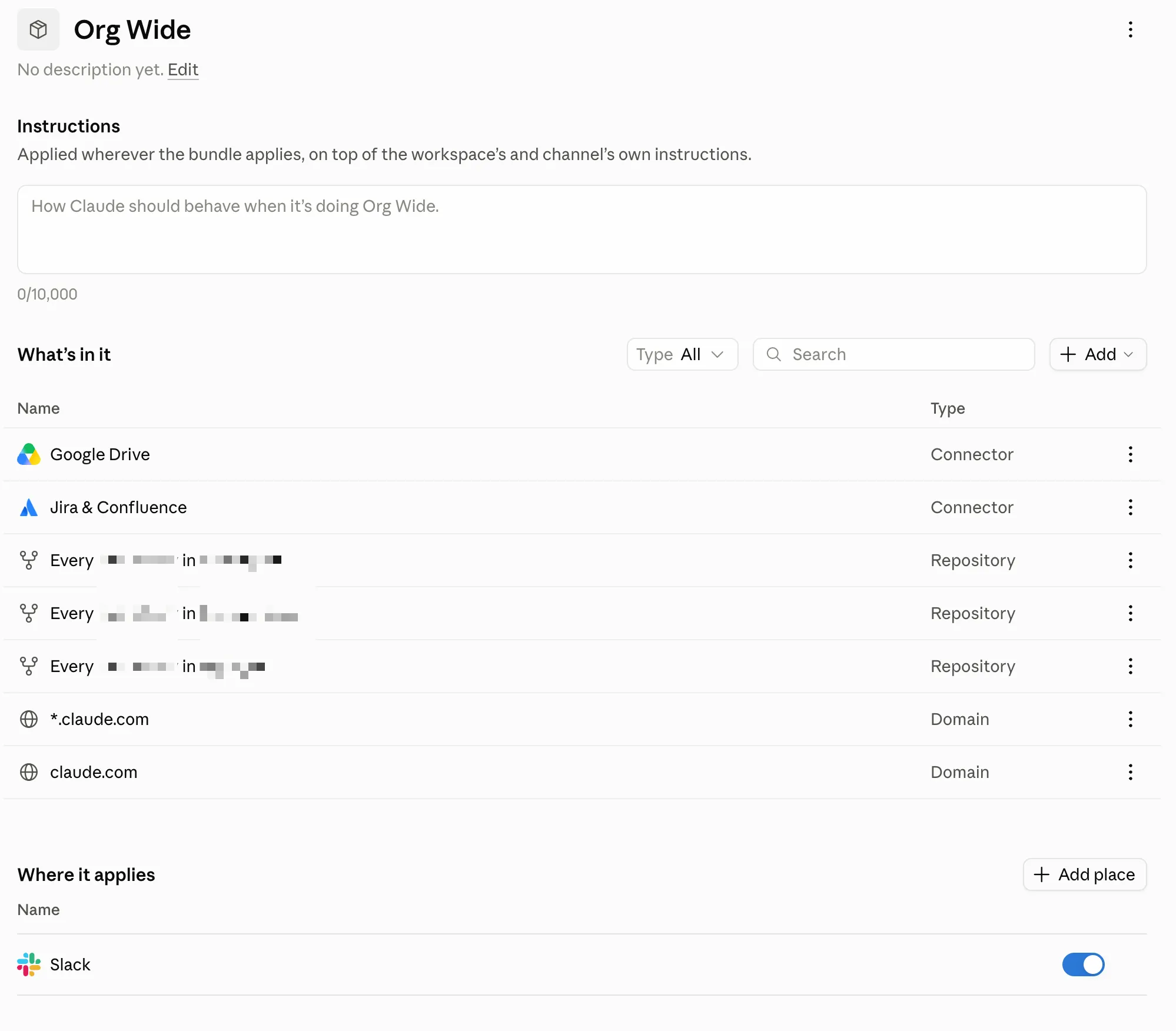
For this to work, the agent needs access to all kinds of systems. In Claude Tag you set up the connections with access bundles. An access bundle is a configuration of connectors, plugins, repositories and domains. You can build them in such a way that you can compose them together.
Here’s a screenshot of one of our access bundles that sets up the common tools we might want Claude Tag to have access to in our org.
Composing Access to Systems
You might have an access bundle that provides access to all git repositories, then another one that provides access to all of your Atlassian products and then another one that talks to your financial provider.
In Channel A you might have the git repositories bundle and the Atlassian bundles. With that configuration Claude can now interact with the git repositories as well as the Atlassian products you use (Confluence and Jira, etc).
Another Example
In another channel you might only use the Atlassian bundle along with the financial bundle for the finance team, because the finance team needs access to financial information as well as some tickets and documents in Confluence, but they have no need to access the git repositories (and maybe you don’t want them to have that access).
Invite to Any Channel, Like an Employee
Claude Tag can be used in public and private channels in your org. This means you could have a private #ui-dev channel that the front-end engineers, product managers, the Chief Product Officer (CPO) and the QA team have access to. In this channel you have Claude, the GitHub access bundle, and the Atlassian access bundle.
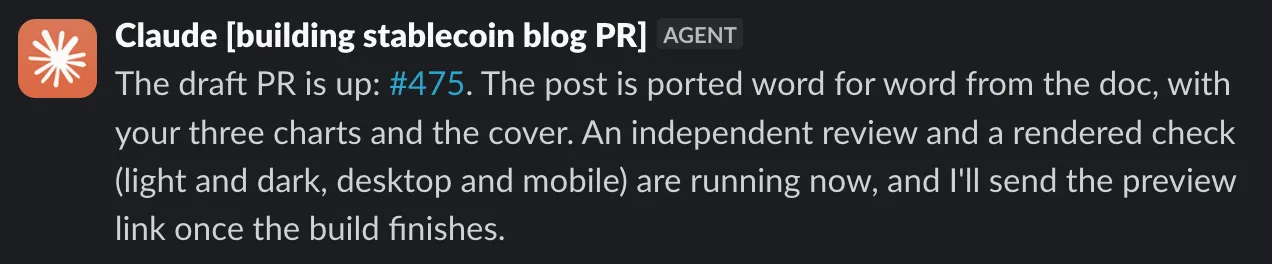
Developers, QA or even the CPO can then ask Claude to make changes to the front-end repository. Claude takes the task and fires off a cloud instance to do its work.
Claude will report back the work and open a PR for you.
Now, I know what you’re thinking:
Your CPO ships code from Slack?
Yes. Claude Tag opens the PR. Every PR goes through our automated AI code review first, then a human review. Upon approval it’s merged and shipped. Our engineering team spent time building a robust harness around the agent (tests, hooks and guardrails) so the things that should not get shipped do not get shipped.
We have an org-wide policy that gives everyone access to our internal repositories, giving flexibility for all to contribute.
The guardrail that keeps things safe is our harness and merge requirements. Everyone has collective code ownership, and a human still has the last word.
Another Example
Assume the finance department uses a webhook from a financial tool to send transactions into a private channel. It sends an amount and a transaction ID. You can configure Claude to watch that channel and use its connected tools accordingly.
You could tell Claude that any time a transaction comes in for over $1,000 USD, you want it to verify that the contractual maximum amounts to be processed are valid for that client (based on some business rule). Claude would use its connections to look up that contract in Ironclad (or wherever it’s stored) and then give you the information you need.
The Self Improving Agent
Now here comes the kicker … Claude Tag will create memories per channel. It will remember important things that have happened in that channel and make sure it acts accordingly going forward. You can even tell it to create a memory of a particular action so it does or doesn’t perform that action again (or does something again if you liked it).
What this means is that as you use Claude Tag, it gets smarter and smarter.
It gets better with use.
Agents Handing Work To Other Agents
You can even have Claude Tag perform other duties for you, like logging a ticket in your ticket system, just like you would with an employee.
We have Claude talking to our other Slack-based agents, which have special access to internal systems (as you saw above with ITAssistant). Claude and the other agent will chat back and forth in Slack figuring out problems together:
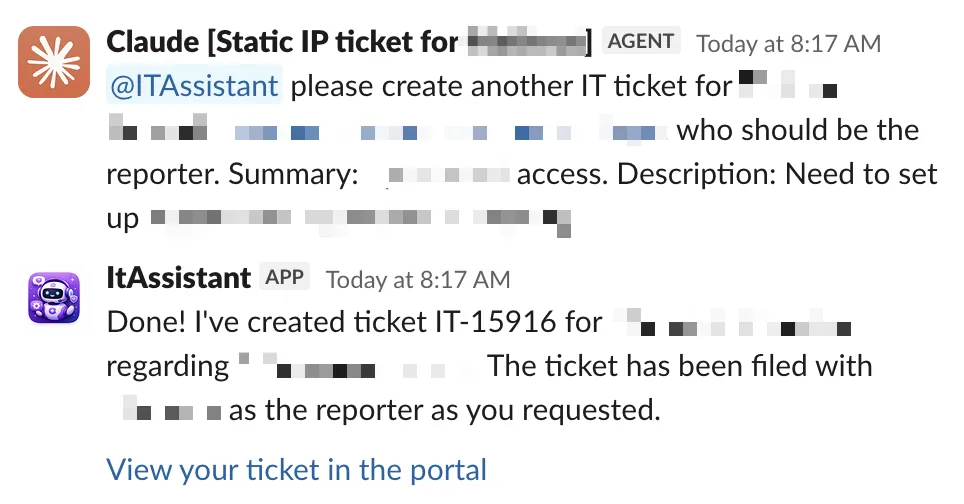
Furthermore, when a ticket is logged another agent in the background (or another channel) can pick up the ticket and start work on it.
At the core level, this is agentic event composition.
You’re having one agent do a specific job, storing results in a durable store (a ticket system, etc), and events fire off where another agent can pick them up.
This is not all you can do with Claude Tag. You can even have it act as a PM in your channels.
An Agent as Your Team’s PM
In my team’s channel our director set up Claude to be the team scrum master. Claude automatically pings each and every one of us at the end of the work day (in our own time zones) to ask for a status update.
Before it pings each of us individually, it researches what I’ve done: tickets I’ve closed, PRs I’ve opened and merged, comments I’ve added elsewhere, and work I’ve completed across the org. Claude will then ask me if there’s anything else I’ve done today and I can augment/update the data in natural language.
At the end of Will’s work day he gets the team’s entire status update, which he can feed into his own agentic pipelines to keep leadership abreast of what is changing.
This has allowed our team to scale from a small focus area to a much wider area that encompasses AI, DevEx, Platform, DevOps and IT.
We’re a very small team that has been able to scale with the help of systems like this. We’ve delegated routine, repeatable and easily discoverable tasks to Claude Tag and it’s been an amazing help to our productivity. The rest of the org has already started following suit.
Now just imagine … you can wire up more systems that emit all kinds of events, connect those events to agents, and the pattern repeats. It’s mind-boggling what’s possible.
What Changed for Us
We’ve since moved a lot of our development (and support) from a local CLI agent to the chat inside of Slack. It’s still Claude doing the work, but now we can do it without the overhead of tooling, the cognitive complexity, and the context switching of configuring an environment.
Claude Tag is doing the work with the same Claude models and the same prompts, but in a remote, isolated environment off of our machines. This enables a kind of scalability that local development can’t match.
Now, as long as the agentic harness is set properly with rules, guardrails, and feedback mechanisms for the agent, the agent can and often will do amazing work.
We have offloaded our entire website development effort to Claude Tag, allowing our non-technical marketing team to ship dozens of updates to our website daily, all without an engineer. Our CEO even updates the website too. This is done completely through Claude Tag. We have a full breakdown on how we do this coming soon.
We now have our product owners, engineering managers, technical managers, and even engineers working with Claude Tag in a collaborative team environment, kicking off work from a chat message in Slack.
This opens up new opportunities too. You can fire off a session from anywhere you have access to Slack.
For example, I was at the gym and realized I forgot to update a ticket. I opened Slack on my phone, voice-to-texted what I needed done to Claude Tag, and Claude Tag took care of it for me, all while I was on the treadmill warming up. It took 20 seconds. I could just as easily have sent it a prompt to start work on the next ticket in the pipeline, and sometimes I do that too.
I’m sure you’re already thinking of all the various composition methods you can implement with this workflow. I know I am.
Options for Non-Claude/Non-Slack Shops
This post focused heavily on Claude and Slack because that’s what we use, and we’ve found it to be an indispensable tool for our business.
However, not everyone is on Claude or Slack, and Claude Tag only works with Slack (at the time of this writing).
If you’re in that camp, you can also get a similar type of setup with the following tools:
- Viktor (works with Slack and Teams)
- Gumloop (works with Slack and Teams)
- Junior (works with Slack and Teams)
- Hermes Agent
- OpenClaw
- Paperclip
The bottom three are the more technical of the bunch and need to be hosted somewhere (though some cloud offerings exist). They also need more configuration than Claude Tag, Viktor, Gumloop, etc.
How to Make This Work for You and Your Team
The keys to getting this to work are the following:
- Agent access to your tools (you might need to create service accounts)
- Codify all actions into skills and make them accessible via skill marketplaces you host on git, where your agents can connect to them
- Agent access to your git repositories (through the Claude GitHub App)
- Channel instructions for what you want the agent to do
- If you want it to reply to every new message in the channel, tell it to, in natural language, and it will
- If you want it to check every 45 minutes for some value in some system, tell it to, and it will. You get the gist
- Hint: turn many of those into skills
- A rock solid agent harness for your repositories (most important)
A rock solid agentic harness is going to include things like:
- A well thought out and developed AGENTS.md/CLAUDE.md file
- A constitution of rules that it must follow
- Good patterns, bad patterns
- Things to never do (enforced with determinism, below)
- A set of guardrails that your agent can use to help guide it
- Tests (UI, unit, integration)
- Linters
- Formatters and style guides
- Deterministic hooks that run scripts that can verify conditions
- Tools like Jev that can help guide the calling agent with confidence
- Deterministic guardrails
- Hooks
- Scripts and GitHub Actions
- Anything else that can tell the agent whether it’s making a good or bad choice
What this looks like is different per repository and project, so we can’t provide a template you can use as-is, but by following the guidelines above you can easily get 80% or more of the way there.
Harden Your Harness with an Agent
Hardening your harness is the most beneficial thing you can do in order to improve the efficacy of your agent in this new development surface (team chat).
To make it easy, here is a prompt you can drop into your agent to have it harden your harness so that your agents operate more effectively. Take it, tweak it, and modify it to get it to do deep research on your code, and you’ll end up far better off than you are now if you’re starting from zero.
What It Costs and How We Keep It Down
Claude Tag is billed at standard API rates, which is not cheap. However, there are ways to tune the system to your needs and keep costs as low as possible.
We default each channel to Sonnet for all tasks.
Channel managers can configure the model for their use case, though. For example, the incidents channel might need Opus-level reasoning for some of the deeper research and introspection work.
We typically avoid Fable due to the cost, though it is very capable.
The Joy of Working with Agentic Personality
Claude Tag is fun to work with, and it is programmed to be fun and witty.
Now that might seem a bit silly from a business perspective, and some might say it’s “a waste of tokens” … but humans are emotional creatures.
As much as we don’t like to admit it, we operate on the level of “feels” and “vibes”. Hell, we have what we call “Vibe Coding” now, so if that’s not proof in the pudding, I don’t know what is.
When you interact with Claude Tag, it will react to your post with emojis that match your style, and will sometimes even reply with something witty. If you configure the channel instructions to be more verbose, witty and sly, it can throw little jabs back at you in real time as well.


It’s polish like this on a product that makes it sticky.
Why?
Because when something works well and it’s fun to use, you have created a sticky product, and that’s exactly what Claude Tag is to us.
The Only Constant is Change
The old adage in software development applies now more than ever:
The only constant is change.
The development surface has moved from the IDE to AI agents, and now it’s moving once again, to collaborative chat interfaces powered by remote backend agents.
This shift enables technical and non-technical members of a team to truly collaborate in a centralized location while delegating the work to an agent via said chat.
It’s time to leave the local tooling behind and move into the cloud so you can start chatting with your agents like employees.
Chaos engineering for Polygon PoS
“Chaos Engineering is the discipline of experimenting on a distributed system in order to build confidence in the system’s capability to withstand turbulent conditions in production.” — Rosenthal & Jones

Chaos engineering for Polygon PoS
“Chaos Engineering is the discipline of experimenting on a distributed system in order to build confidence in the system’s capability to withstand turbulent conditions in production.” — Rosenthal & Jones
Sep 1714 minEveryone at Polygon builds their own agents now. And the best thing we did to help them was get out of the way
We built our colleagues’ agents one at a time until the upkeep quietly became the job. So we stopped building them and handed everyone the platform instead — 12 agents running, 11 in the works, 605 runs last month.

Everyone at Polygon builds their own agents now. And the best thing we did to help them was get out of the way
We built our colleagues’ agents one at a time until the upkeep quietly became the job. So we stopped building them and handed everyone the platform instead — 12 agents running, 11 in the works, 605 runs last month.
Sep 176 minI got tired of downloading HTML files from Slack, so I built Primer
A weekend tool for sharing one LLM-generated document turned into the place the whole company reads, comments on, and iterates with agents on everything they publish.

I got tired of downloading HTML files from Slack, so I built Primer
A weekend tool for sharing one LLM-generated document turned into the place the whole company reads, comments on, and iterates with agents on everything they publish.
Sep 157 min